
After 25 years of doing the work, your resume might be what’s standing between you and the interview. Not your skills. Your dates.
Résumé Botox means editing your resume to smooth out age signals — dropping the graduation year, trimming decades-old jobs, softening a senior title — and a brand-new October 2026 survey of 4,263 job seekers found 42% have done exactly that, most with free AI tools. In this guide you’ll find: what résumé Botox is, the survey numbers behind this week’s headlines, five copy-paste AI prompts I ran through free ChatGPT and Gemini (real screenshots included), whether age-proofed resumes still pass ATS scans, and exactly where the honesty line sits.
⚡ TL;DR — the short version
- It’s real and it’s everywhere: 42% of job seekers in a new 4,263-person survey have edited their resume or LinkedIn to look younger or less senior. Women 45+ do it most (53%).
- Free AI does the heavy lifting: 72% of those making the edits used AI — the same five moves work in free ChatGPT (no account) and Gemini in ~20 minutes.
- It works, but there’s a line: 43% got more interviews after editing. The trick is curation, not fabrication — this guide shows you precisely where one ends and the other begins.
- Your experience is the asset. Age-proofing isn’t hiding who you are — it’s making sure a recruiter sees your last ten brilliant years, not a 1990 graduation date.

What is “résumé Botox,” exactly?
Think of it the way the name suggests. Cosmetic Botox smooths wrinkles; résumé Botox smooths the little signals that whisper your age to a recruiter before they’ve read a single accomplishment:
- Removing your graduation year
- Cutting jobs from 15+ years ago to a one-line “Early Career” summary
- Softening “Senior Director of Operations” so it doesn’t scream overqualified and expensive
- Swapping dated verbs (“responsible for,” “utilized”) and dead tech (“Lotus Notes,” “fax machines”) for current language
- Updating the LinkedIn photo to one from this decade
Coaches have advised this for years — what’s new is the scale. On October 15, 2026, Use.AI surveyed 4,263 job seekers across the US, UK, Canada, and the EU: 42% had removed or changed CV or LinkedIn details to appear younger or less senior — graduation years, early jobs, senior titles, photos. The press release notes candidates worry more about human recruiters than automated systems. The standout: 53% of women 45+ made these changes (vs 35% of men) — strategy under pressure, not vanity. It’s not just American either: Employment Hero found 28% of Canadian workers had downplayed their experience, mostly to dodge the “overqualified” label.
Why are so many experienced people doing this?
Because the fear is grounded. A recent AARP survey found two-thirds of workers 50+ have seen or experienced ageism at work, and 91% believe age discrimination is common — showing up as “less tech-savvy” (33%), “resistant to change” (24%), accomplishments ignored (20%). Fast Company’s October 15 coverage lays it all out.
Of those who edited, 56% believed human recruiters would filter them out otherwise — only 38% worried about AI screeners. Never about fooling robots; about getting a fair read from people. And it works: 43% got more interviews afterward versus 10% who got fewer. That’s a rational response to a broken filter, not a hack.
So no, you’re not being vain, and you’re not alone. The question is how to do it well, honestly, and free — that’s the rest of this guide.
🔬 How we tested
We built a fictional 28-year resume for “Maria Santos,” a 58-year-old operations leader (invented — not a real person), and ran age-proofing prompts through the free tiers of ChatGPT (guest mode, no account) and Gemini on October 16, 2026. Caveats: Claude‘s free tier sat behind a bot-verification loop we couldn’t clear, and Enhancv’s free checker has gone upload-only, so that scan couldn’t run. Every screenshot is from the real tests. We’re the ToolsAxis team — we show our work.
The 5 free-AI age-proofing moves (with copy-paste prompts)
Five moves, five prompts, about twenty minutes. Each is a prompt I actually ran — with the real outputs, including where the tools surprised me.
Move 1: Soften the senior title (without lying about it)
The highest-leverage edit here. “Senior Director of Operations” makes a recruiter do instant salary math — and for a mid-level role, that math ends your candidacy early. You need a less expensive-sounding title that still describes the work honestly.
The prompt (paste into free ChatGPT — it worked in guest mode, no account):
“I am 58 and applying for an Operations Manager role. Rewrite my job title ‘Senior Director of Operations’ into 3 options that won’t make me look overqualified — do not invent new responsibilities, just reframe the title honestly.”
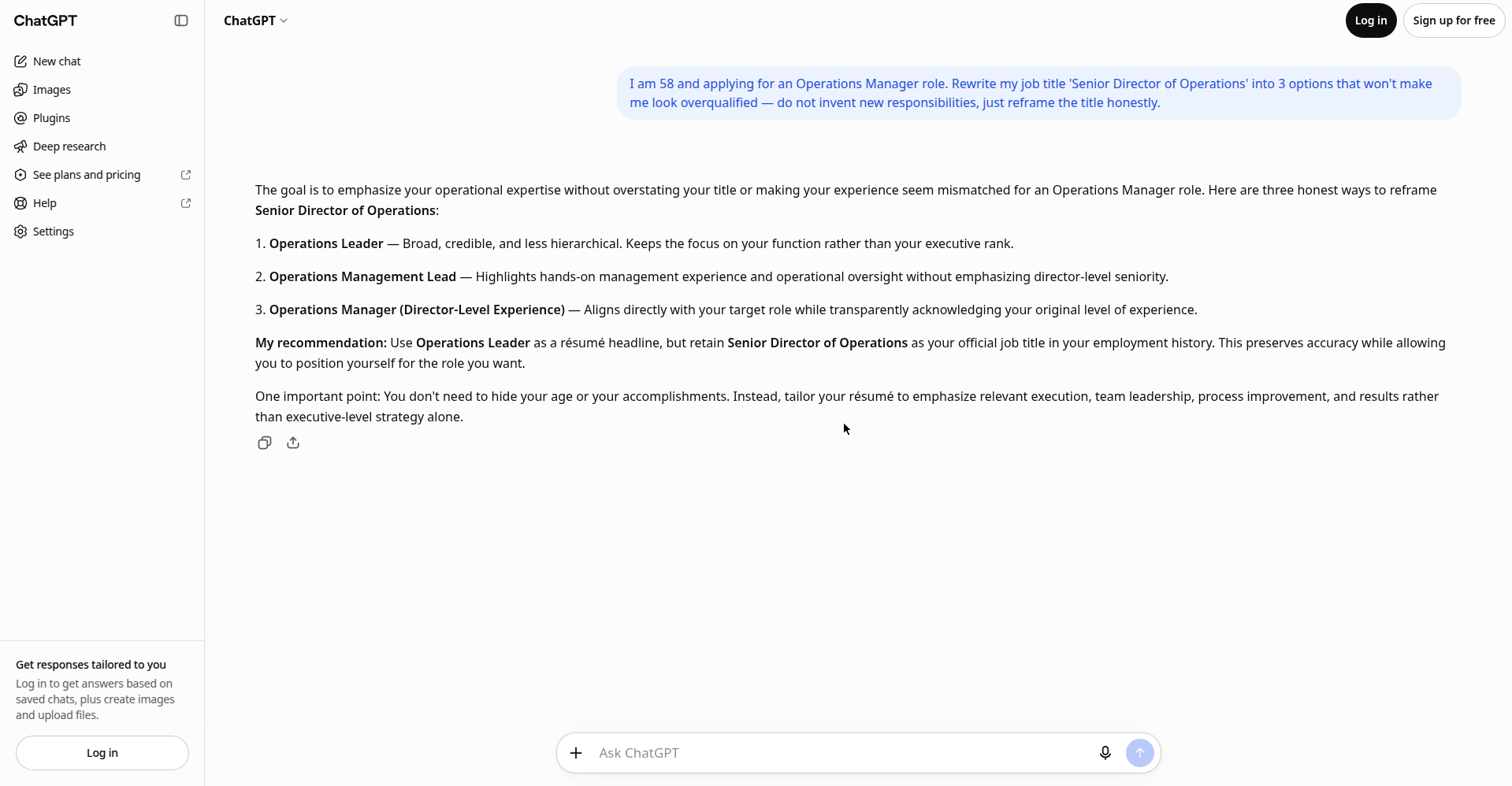
What the free tier gave me: “Operations Leader” (its headline pick), “Operations Management Lead” (hands-on), and “Operations Manager (Director-Level Experience)” (matches the target role, transparent about the real level). Unprompted, it added the key advice: don’t hide accomplishments, keep the official title in your employment history, tailor to results. No signup, no paywall.
One caution: use a title your former employer would confirm on a reference check. Coaches often recommend “Senior Director of Operations (Operations Management)” — the real title, with the target keyword beside it.
Move 2: Trim the timeline to your best 10–12 years
As resume coach Ashley Watkins Thomas says: “There’s rarely a position that’s going to post and ask for more than 10 years of experience.” The structure: full detail on the last 10–12 years, a one-line “Early Career” summary for the rest, graduation year gone.
The prompt:
“Condense this 28-year work history to focus on the last 12 years, and give me a one-line ‘Early Career (1996–2008)’ summary for the rest. Keep every fact true to the original: [paste your work history]”
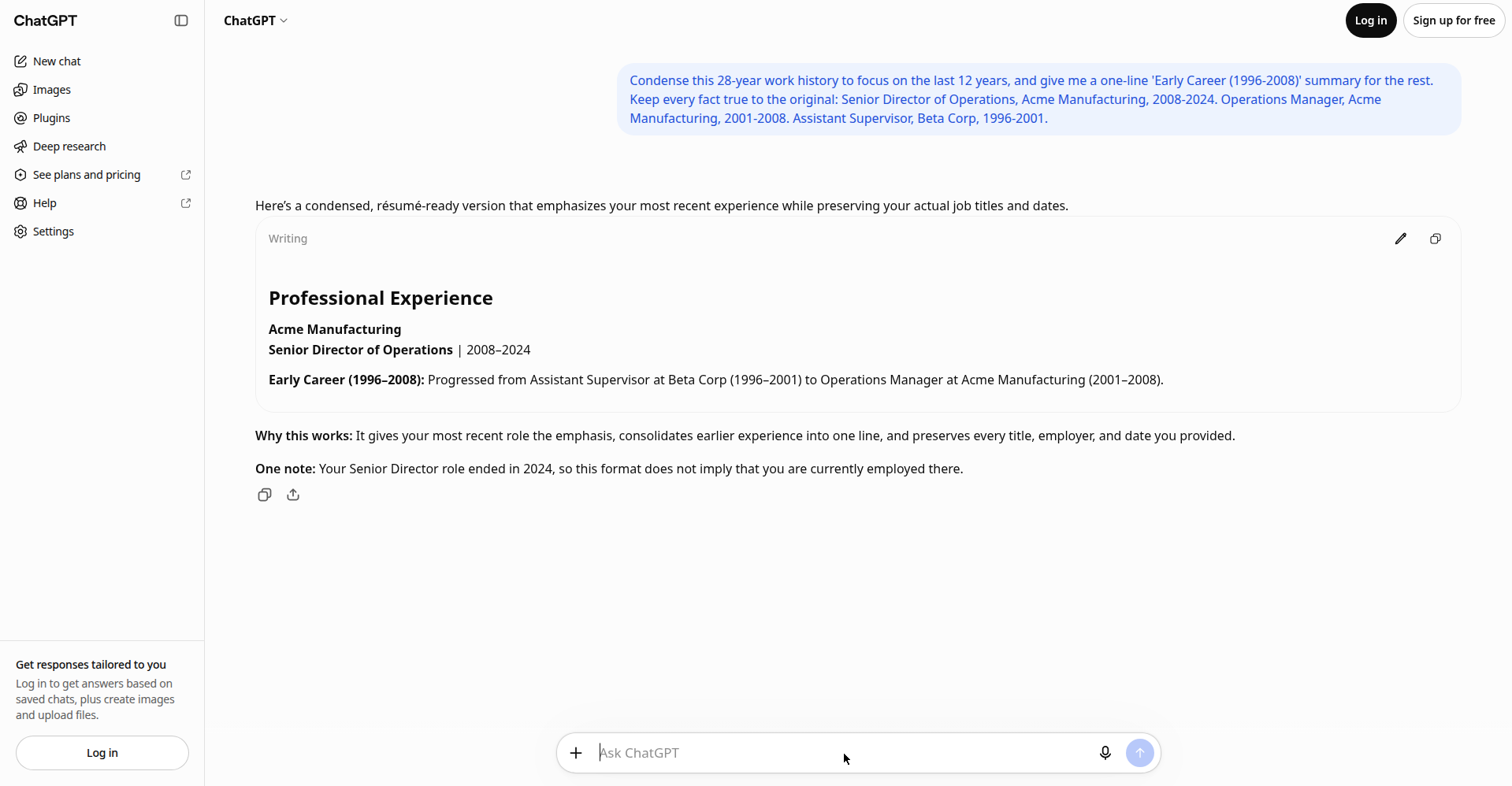
What the free tier gave me: the 2008–2024 role in full, plus a clean one-liner: “Early Career (1996–2008): Progressed from Assistant Supervisor at Beta Corp to Operations Manager at Acme Manufacturing.” Every fact true — and it flagged its own honesty risk, warning me not to present the past role as current.
Move 3: Modernize the verbs, kill the dead tech
Nothing dates a resume faster than its vocabulary. “Responsible for overseeing,” “utilized synergies,” “fax-based ordering” — a recruiter reads those and pictures a different century. The facts are fine; the words are the problem, and this is the edit AI is genuinely great at.
The prompt (I ran this one in free Gemini):
“Modernize these resume bullet points: replace dated verbs and obsolete tech with current professional language, but keep the facts identical. [paste your bullets]”
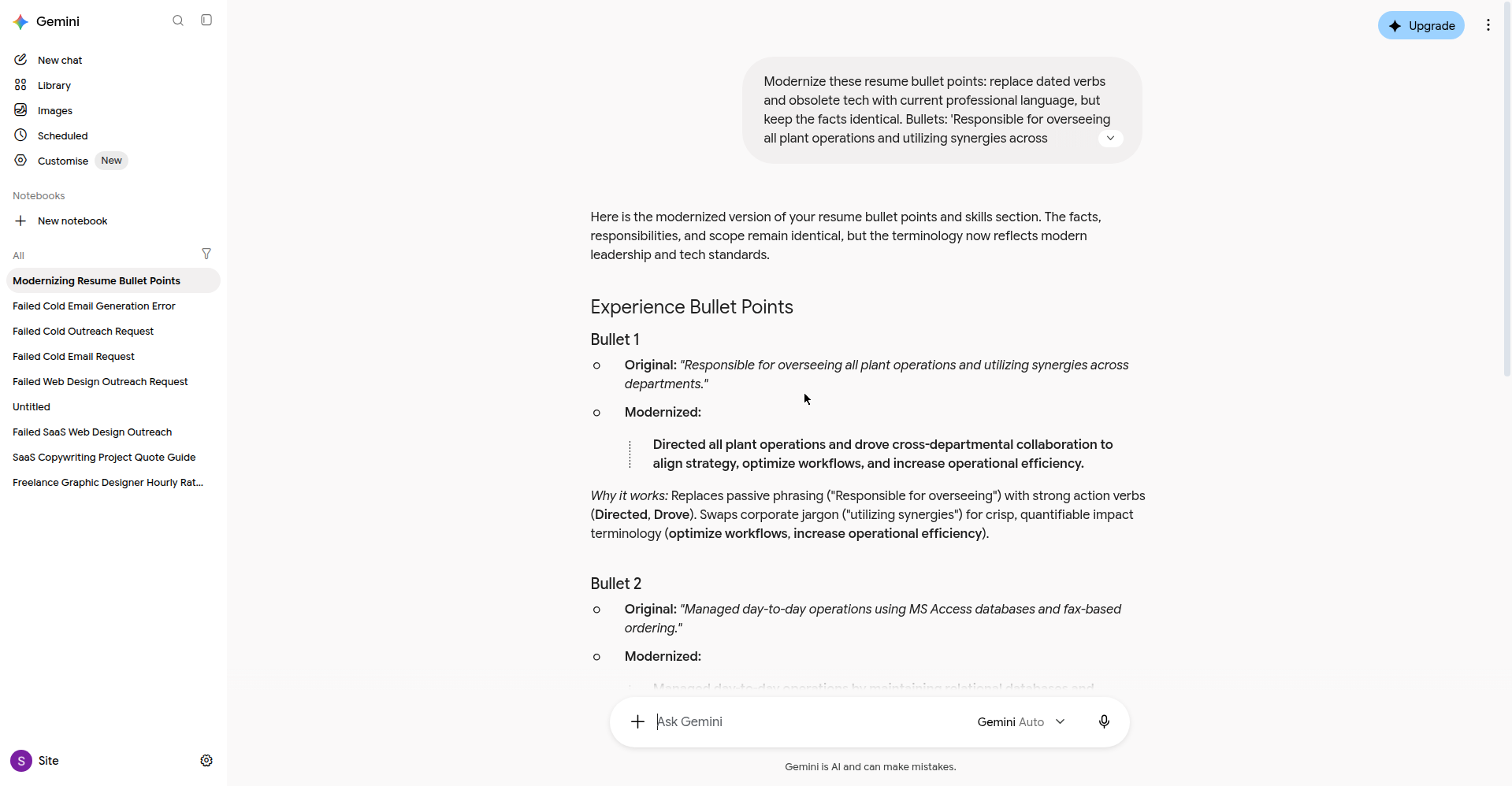
What the free tier gave me: “Responsible for overseeing all plant operations” became “Directed all plant operations and drove cross-departmental collaboration.” The MS Access/fax bullet became database maintenance plus streamlined vendor fulfillment. Skills mapped too: MS Office → Microsoft 365, Lotus Notes → Slack/Teams, fax → vendor & order management. Facts preserved. No limits hit.
Two rules. First, never let the AI upgrade your facts — “used MS Access” becoming “built cloud pipelines” is fiction, not modernizing (see Move 5). Second, read the output aloud — if it sounds like a brochure instead of you, dial it back. Matching the job description’s real keywords beats sounding fancy every time.
Move 4: Rewrite your summary for relevance, not history
“Seasoned professional with 28 years of experience…” flashes your age in the first three seconds. Flip it — lead with what you solve: [Target role] who [concrete outcome]. Recently: [one proof point]. Skilled in [3–4 JD keywords].
- Before: “Senior operations leader with 28 years of experience overseeing plant operations and utilizing synergies across departments.”
- After: “Operations manager who cut order-processing time 30% across two manufacturing plants. Recently led a 45-person team through an ERP transition with zero downtime. Skilled in lean process improvement, vendor negotiation, and cross-functional team leadership.”
The second version could belong to a 38-year-old or a 58-year-old — that’s the point. Every claim is checkable; nothing is hidden. Our free AI resume builder guide covers which tools handle summaries without paywalling your download.
Move 5: Run the honesty check (the most important prompt here)
This is the move that separates smart editing from something you’d regret in a background check. After making your edits, paste them into a chatbot with one job: catch you if you’ve gone too far.
The prompt (run it yourself in any free chatbot):
“I age-proofed my resume: I removed my 1990 graduation year, changed ‘Senior Director of Operations’ to ‘Operations Manager’, and compressed jobs from 1996–2008 into one line. Flag anything here that crosses from smart editing into misrepresentation a hiring manager would consider dishonest.”
Full disclosure: I tried running this check in Claude’s free tier, but a bot-verification loop blocked access before I reached the product — so I can’t show its output. What I can tell you: ChatGPT volunteered the same instinct unprompted in Move 2, warning me not to present a past role as current. Use any chatbot for this step; the value is the second pair of eyes, not the brand.
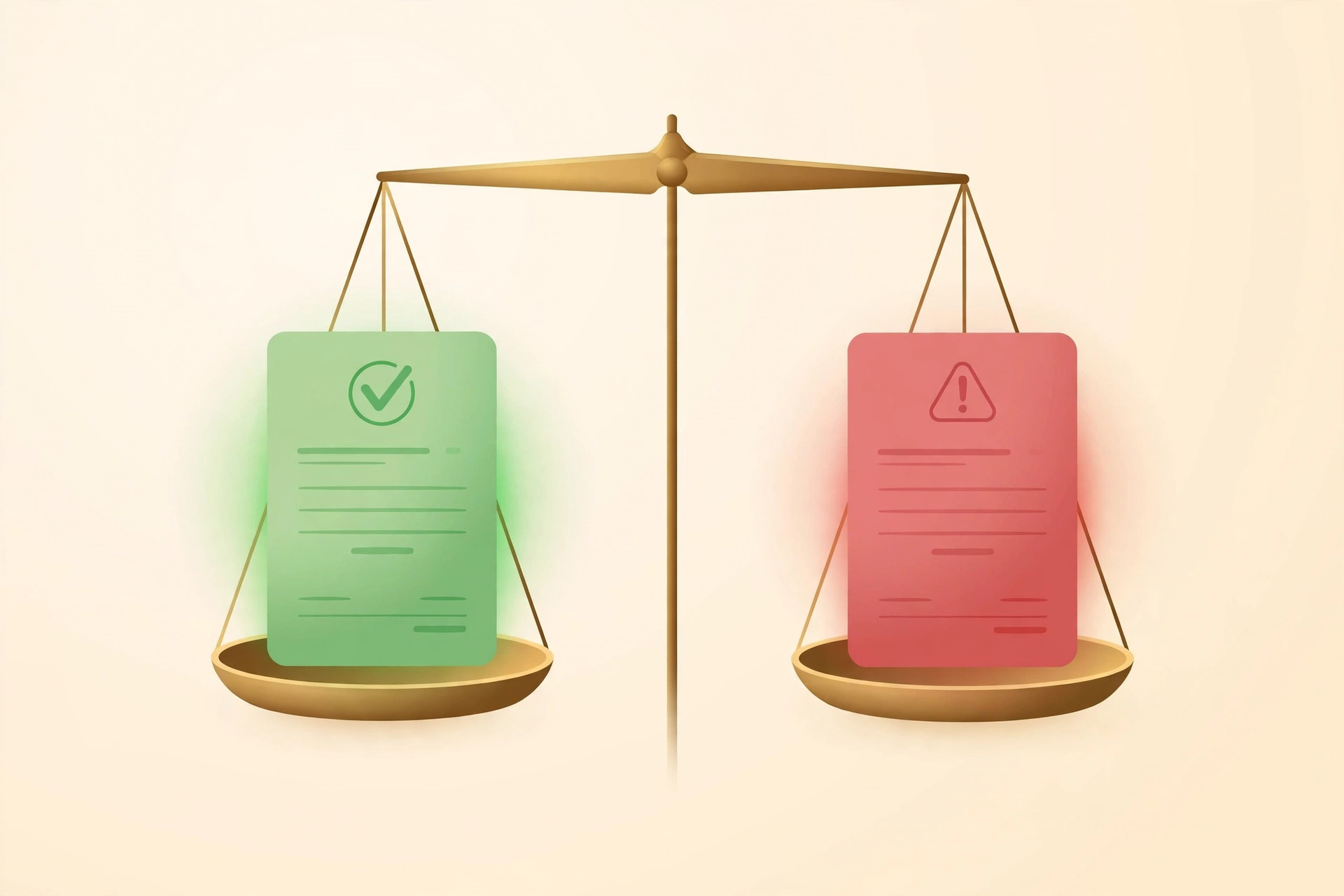
Here’s where the line sits, plainly:
| ✅ Smart editing (curation) | 🚫 Misrepresentation (fabrication) |
|---|---|
| Removing your graduation year | Claiming a degree you don’t have, or a different year |
| Compressing 1996–2008 into an “Early Career” line | Deleting a job to hide a firing |
| Reframing a title your employer would confirm | Using a title they’d contradict on a reference check |
| Modernizing “utilized synergies” into plain language | Letting AI upgrade “used MS Access” into “built cloud pipelines” |
As LinkedIn career strategist Katy O’Loughlin put it: “It’s not dishonest — it’s strategic storytelling. The key is curation, not fabrication.” Her warning: “The risk isn’t CV botox — it’s over-botox.” My rule: if you’d be embarrassed explaining the edit in an interview, don’t make it.
Will an age-proofed resume still pass the ATS?
Usually it passes better. Trimming old jobs removes obsolete keywords that confuse parsers; modernized verbs align with today’s job descriptions. No parser awards points for “B.A., 1990.”
Honest caveat: I went to re-run the free Enhancv ATS scan from our last guide — the only free scan I’d found with zero sign-up — and it’s changed: now upload-only (PDF & DOCX, max 2MB), no paste-text option, so I couldn’t run it from my test setup.
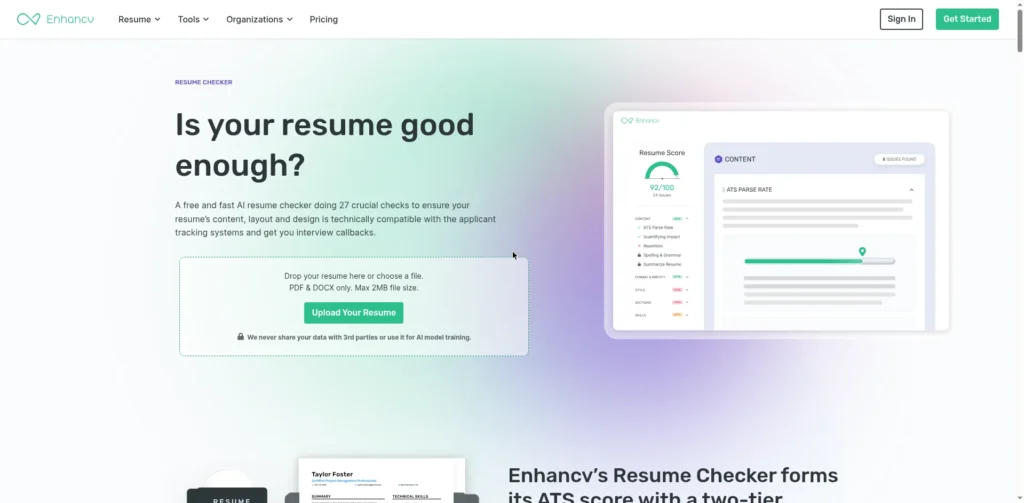
But the visit wasn’t wasted — the screenshot holds the real story: Enhancv now lists “Age and date bias” and “Employment gaps” among its checks, plus “Tailored job title.” The ATS industry is literally building age-proofing detection into its products. The machines have noticed what 42% of job seekers are doing.
Three ATS tips for experienced candidates: one clear title per role (parsers stumble on hybrids — save the original for the cover letter); mirror the job description’s keywords in your skills section (our free keyword finder pulls them in minutes); and use a clean single-column template — start from a verified free ATS-friendly template, then apply the five moves.
The free tools, compared honestly
| Tool (free tier) | Signup? | Best age-proofing use | Watch out for |
|---|---|---|---|
| ChatGPT (guest mode) | None — temporary chat, no account | Title reframes + timeline condensing; volunteered honesty flags | Guest chats don’t save history — copy your outputs |
| Gemini (free) | Google account | Verb and tech modernization with facts preserved | None hit in testing |
| Claude (free) | Account (untested) | Second-opinion honesty reviews — if you can reach it | We hit a bot-verification loop; your mileage may vary |
| Enhancv checker (free) | None — but upload-only now | Confirming the age-proofed resume still parses | Needs a PDF/DOCX file; one scan’s opinion, not gospel |
Privacy note: free chatbot tiers may use your inputs to improve their models. Strip employer names and contact details before pasting — the prompts work just as well with “[Company A, 2008–2024]” as the real name.
Résumé Botox FAQ
Is résumé Botox lying on your resume?
No — it’s curation: choosing which true facts to emphasize. It becomes lying when you invent facts — fake titles, shifted dates, skills you don’t have. If every line is still true, you’re editing, not fabricating.
Will recruiters or AI detectors flag an AI-edited resume?
What gets flagged isn’t “used AI” — it’s generic, interchangeable AI text (33% of HR pros call AI-polished applications their top stressor). The fix is in every prompt above: keep your real facts, numbers, and voice. An AI-assisted resume full of checkable specifics reads nothing like the sea of sameness.
Should I remove my graduation year?
For most experienced candidates, yes. No ATS scores “B.A., 1990,” and it’s the loudest age signal on the page. Keep the degree; drop the year.
How far back should my work history go?
Ten to twelve years of full detail, plus a one-line “Early Career” summary. Two pages max — matching AARP’s guidance: focus on the past decade, add an early-career highlights line, remove dated tech.
Is age-proofing “selling out”?
Every resume is already a curated document, not an autobiography. You wouldn’t wear a 1998 suit to the interview; don’t make your resume wear one either. Age-proofing says “look at what I can do for you now.” That’s not selling out — it’s marketing, and your experience deserves good marketing.
The bottom line
4,263 people didn’t wake up and decide to be sneaky. They saw a market where two-thirds of older workers report ageism, did the math, and reached for free tools. The 43% who got more interviews aren’t cheaters — they’re proof the filter was the problem.
Your 25 years aren’t a liability. They’re why you’ll outperform the person with five. Start with Move 1 tonight — ninety seconds — and run the honesty check before sending anything. Your first age-proofed resume is closer than you think. 💪
Add ToolsAxis as a Preferred Source in Google Search — open any of our articles in Google, tap the star/source icon, and choose ToolsAxis. You’ll see our newest job-seeker-tested AI guides first.
Last updated: October 16, 2026. Tool features, free-tier limits, and prices were verified hands-on against the official sites on October 16, 2026 and change frequently — if you spot something outdated, let us know and we’ll re-test and correct it.
Get One Useful AI Tool Tip Every Week
One practical AI tool tip in your inbox every week. No spam, unsubscribe anytime.

We’re the team behind ToolsAxis. We hands-on test free AI tools for job seekers — signing up for free plans, taking real screenshots, and fact-checking every claim before publishing. Our guides cover resumes, ATS optimization, interview prep, and LinkedIn.
Enjoying ToolsAxis guides?
Add us as a Preferred Source on Google — you'll see our latest tools and guides first in Search, Top Stories, and AI Overviews.