
7 Free AI Job Recommendation Tools That Actually Match Your Resume to Real Jobs
Here’s a confession: when I first started digging into AI job tools, I assumed “job recommendations” meant another spammy job board flooding my inbox with irrelevant listings. Then I opened eight of them this week, and the good ones surprised me. Free AI job recommendation tools scan thousands of live job listings and score how well your resume fits each one, so you stop spraying applications everywhere and start applying where you genuinely have a shot. Seven are genuinely useful and free; one turned out to be a chat assistant in a job-matcher costume. Below: what each one does, where the free plan ends, what happens to your resume data, and my 20-minute workflow.
In this guide you’ll find: 7 free AI job recommendation tools I checked hands-on — Google Career Dreamer, Simplify, Jobright, CareerAgent, Teal, Huntr, and Earn Better by EarnIn, a bonus tool worth knowing, a side-by-side comparison of every free plan’s real limits, an honest look at what happens to your resume data, a 20-minute workflow, and the questions I kept asking myself while testing.

TL;DR — the short version
- Start with Google Career Dreamer if you’re figuring out what roles fit — completely free, no signup, data stays in your browser.
- Simplify and Jobright are the two real AI job matchers: daily matched listings, free, with paid tiers available. Note: Simplify’s privacy policy allows AI training on your data.
- CareerAgent gives you a free AI Fit Report for any single job posting with no account — and explains why you match instead of handing you a mystery score.
- Teal and Huntr score your resume against specific jobs and help you tailor it — free forever with clear limits.
- Earn Better by EarnIn is 100% free with no paid plans at all, ranking matches by fit — not by who paid to promote the listing.
- No tool here will apply to jobs for you, and that’s a good thing — auto-apply tools get applications flagged.
Fresh in October 2026: three new names worth a look before you pick
This space is moving fast — three genuinely new entries landed in the last few days of October, and I’d rather you hear about them from me than stumble on them in a Reddit thread:
Job Hunter Agent — a free, open-source AI agent (built by Rinku Lodhi, posted on dev.to October 19, 2026) that searches Google Jobs, LinkedIn, Indeed, Naukri, and iimjobs at the same time, filters out stale postings by age (24 hours to 30 days), scores every role 0–100 against your profile with Gemini AI, and pings your top matches over Telegram. No signup, no API keys. For an open-source tool, the freshness filtering is the clever part — most job boards drown you in reposts.
Novoresume’s 10 free AI tools — launched October 19, 2026, this expands Novoresume from a resume builder into a full job-search toolkit: resume generator, rewriter, summary and objective generators, bullet generator, resume-to-job matcher, cover letter generator, ATS checker, AI bio generator, and salary calculator. Each tool is free for two uses a month (no signup for the first use; the salary calculator needs no account at all). Honest caveat from their own launch coverage: two uses a month is a taste, not a workflow — you’ll hit the ceiling fast on the matcher and ATS checker.
jobfishing — a free AI job matcher for Switzerland, Luxembourg, Germany, and the Netherlands (formerly JobMatchFlow) that pulls roles straight from company career pages — it claims to surface them 0–3 hours after posting, versus 12–48 hours on LinkedIn — then scores each one against your CV. Geography-limited, but the “apply first” logic is sound anywhere.
I haven’t tested any of these hands-on yet, so treat this as a heads-up, not a review. If you try one, come back and tell me how it went — that’s how this list gets smarter.
(Sources: Job Hunter Agent — dev.to/insideofcub/ai-agent-that-finds-fresh-jobs-across-portals-scored-for-you-16ic, published 2026-10-19; Novoresume launch — newproductslaunchguide.com, Oct 19, 2026; jobfishing — jobfish.ing.)
How we tested
I’m on the ToolsAxis team — our rule: we don’t recommend tools we haven’t opened. This week I went through eight AI job recommendation tools one by one — homepages, feature and pricing pages, privacy policies, and the free signup flows (stopping before creating any account). I noted where each signup wall appears, what the free tier includes, what paid plans cost, and what each privacy policy says about your resume data. Where I couldn’t get past a wall without an account, I say so. Nothing below is sponsored and there are no affiliate links — every link goes to the tool’s official site.
1. Google Career Dreamer — the free starting point that asks for nothing
If you’re early in your search — switching careers, or just unsure what you’re qualified for — start here. Google Career Dreamer is an experimental Google Labs tool that builds a “career identity statement” from your background and skills, then explores roles you might never have considered.
What I liked most isn’t the AI — it’s the terms: completely free, no paid plans, no pricing page, no signup. I clicked Start and went straight in. Per Google’s own FAQ, your data stays in your local browser — the gold standard of privacy here.
The honest caveat: Career Dreamer is career exploration, not a live job-listing matcher. It won’t hand you ten open roles tonight — it’s the conversation before the search, stopping 200 random applications once you know which 20 matter.
Best for: career changers, new grads — anyone unsure what to search for.
Price: free, no paid tier.

2. Simplify — daily AI job matches plus one-click apply
Simplify is what most people picture hearing “AI job recommendations”: build a profile, get daily job matches, autofill applications with Copilot, track everything in a built-in tracker. The free plan includes all three.
Two things to know. There’s an immediate signup wall — no guest browsing. And the privacy policy says Simplify may use your information to “train, evaluate, develop, and improve” its AI. Unusually blunt — but if it bothers you, use a trimmed resume here or lean on the stricter tools below.
Free limits: daily matches, Copilot autofill, and the tracker. Simplify+ costs $19.99/week, $39.99/month, or $89.99/3 months.
Best for: high-volume appliers wanting matches, autofill, and tracking in one place.
3. Jobright — the AI copilot that scores every match
Jobright is an AI job search copilot: matches you to jobs, tailors your resume per role, drafts cover letters. Everything is free, but some features carry daily limits — resume tailoring hits first. A paid unlimited tier exists, though prices only appear inside the app — no public pricing page, which felt a little cagey.
Like Simplify, Jobright shows a signup modal immediately — but its privacy policy carries no AI-training statement.
Best for: job seekers who want matching, tailoring, and cover letters from one assistant.
Price: free with daily limits; paid unlimited tier priced in-app.

4. CareerAgent — a free AI Fit Report that explains itself
The nicest surprise of my week. CareerAgent does something different: paste in any single job posting and get a free AI Fit Report — no account required. Instead of a black-box score, it explains the match: exact skills to add, a referral plan with ready-to-paste LinkedIn searches, and a resume tailored to that role as a clean PDF.
Generous for a no-account tool: Fit Report, job alerts (daily 3 days, then weekly), 3 free tailored resumes. And from their own FAQ, the line that sold me: they find, score, and explain matches, “but you send every application yourself. Auto-apply is not a feature, and we would never submit anything without your explicit approval.”
One honest flag: CareerAgent describes itself as India-first. Matching should still work for US, UK, Canadian, and Australian listings, but course suggestions and the referral playbook lean Indian.
Best for: anyone eyeing one dream posting, wondering “do I stand a chance?”
Price: Fit Report free, no account; Founding Pro for daily alerts and higher limits.
5. Teal — match scores plus the tailoring to fix them
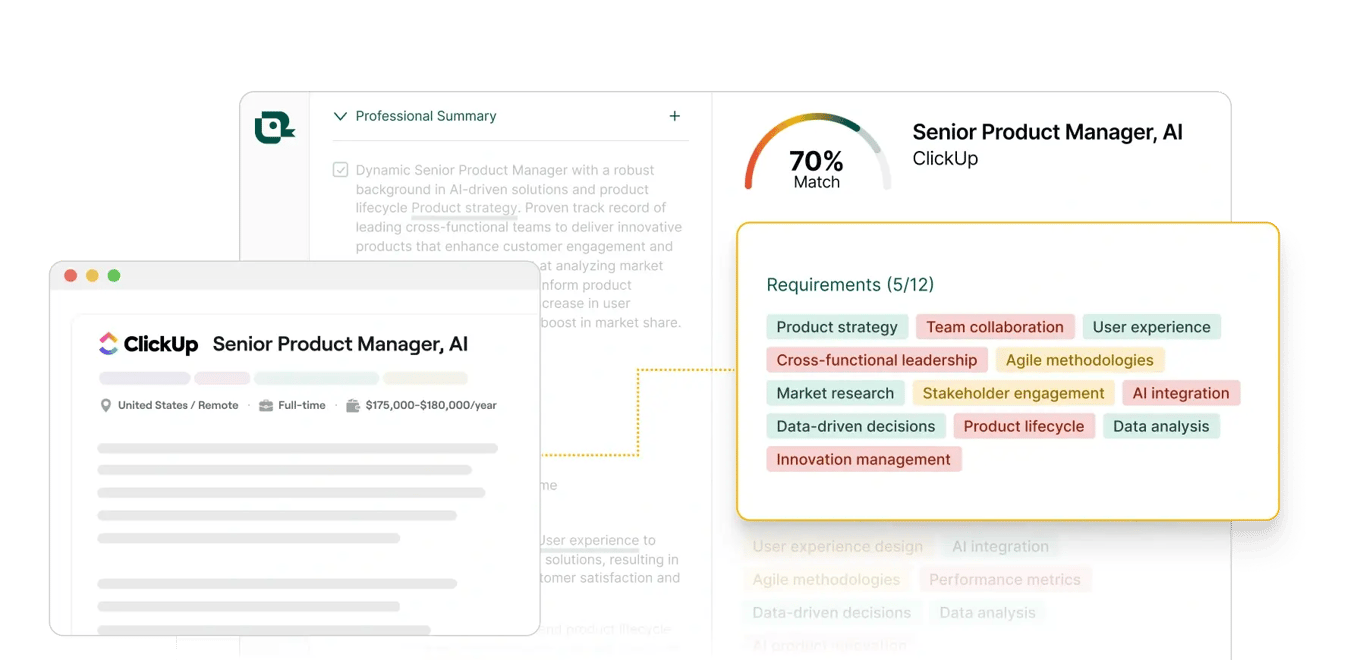
You may know Teal as a resume builder, but its Resume Job Description Match belongs here: it scores your resume against any posting and shows which requirements you’re hitting or missing. The screenshot above is the real thing — a 70% match, every requirement tagged. Pair it with our tested guide to free AI resume keyword finder tools to see which keywords the score judges you on.
The free plan is genuinely “Free Forever”: unlimited resumes and tracking, 10 templates, top-5 JD keyword matching, and starter AI credits. The signup wall appears before you can attach a resume — no guest mode. Teal+ runs $13/week, $29/30 days, or $79/90 days.
Teal says career content may improve AI models in anonymized, aggregate form — better than raw training data, not as strict as local-only. Its referral program pays in free months, not cash: no hidden sales agenda here.
Best for: turning a 60% match into 85% before you hit apply.
Price: free forever with AI-credit limits; Teal+ from $13/wk.
6. Huntr — match scoring inside a full job-search command center
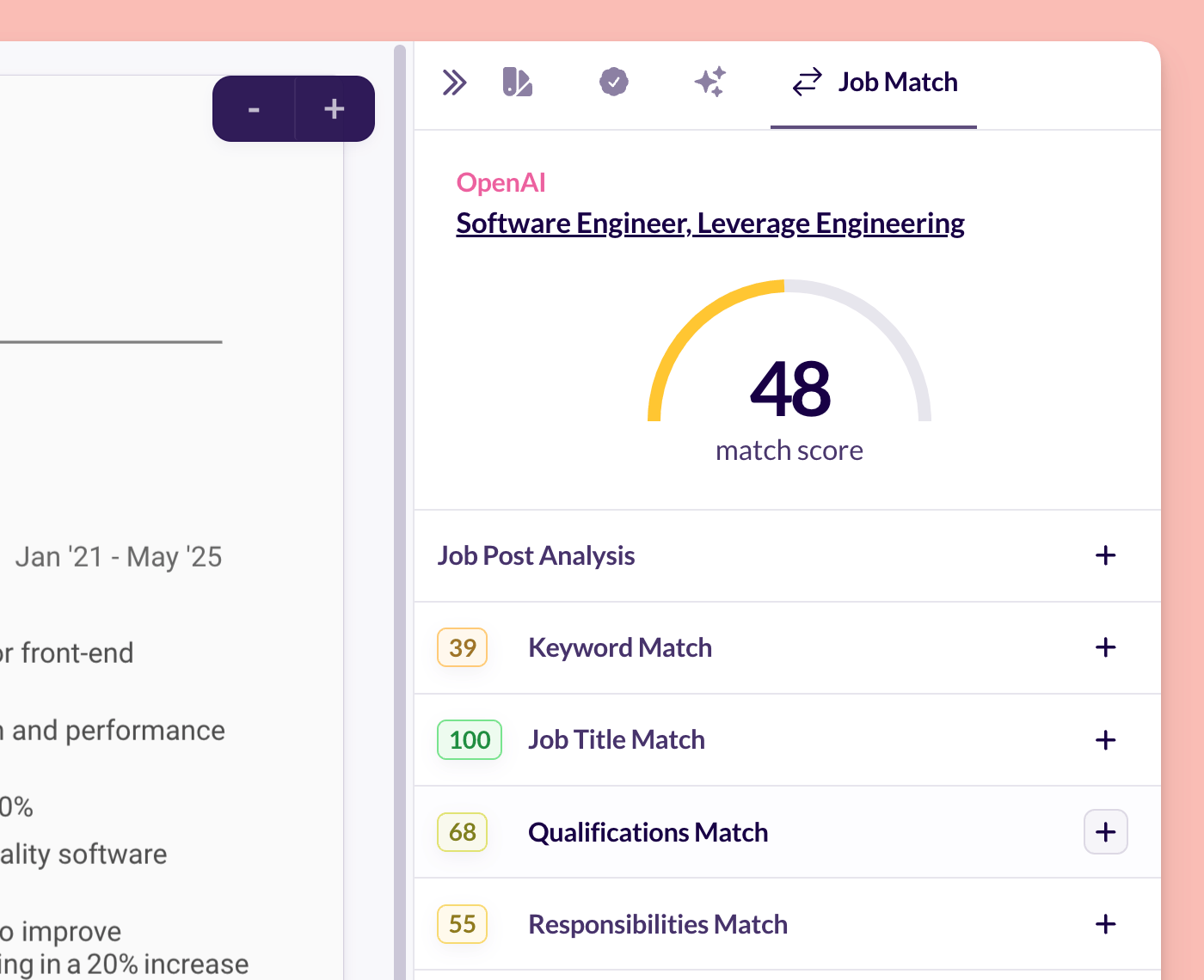
Huntr bundles AI matching into a bigger toolkit: resume builder, resume tailor, application tracker, networking contacts. Free plan: basic matching and scoring (the match dial above is real), 2 tailored resumes, unlimited base resumes, 100 tracked jobs.
You’ll need an account — the signup prompt appears before the Resume Tailor. Pro costs $40/month ($90/3 months, $160/6 months), the steepest tier here, but the free plan runs a real search alone. Huntr’s privacy policy (February 2024) contains no AI-training statement.
Best for: organized types wanting matching, tailoring, and tracking under one roof.
Price: free with limits; Pro $40/mo.
7. Earn Better by EarnIn — 100% free, matches ranked by fit
Earn Better recently rebranded to “Earn Better by EarnIn” — I checked the job matching survived, and it did. The pitch: matches ranked by fit, not by who paid to promote the listing. Same app includes a free AI resume builder, cover letters, and interview prep.
The remarkable part: 100% free — no paid plans, no pricing page, no upsell. Per their FAQ, no subscription or credit card is ever required. The tradeoff: you need an EarnIn app account — no web guest mode. EarnIn’s privacy policy (August 6, 2026) collects resume and job-search data but makes no explicit AI-training statement.
An honest note: EarnBetter publishes product visuals only at small phone-sized dimensions, so no proper screenshot met our quality bar. What’s described above is what their site and FAQ say, in their own words.
Best for: anyone allergic to upsells — the whole thing is free, full stop.
Price: free. There is no paid tier.
One more worth knowing (and one that didn’t make the list)
CareerDiary (careerdiary.io): AI tailoring on Google Gemini, 7 days of Pro for new accounts, free plan with 5 AI credits a day. Standout privacy — contact details are stripped before the AI sees them, scan text is transient, never stored, and guest mode needs no signup. No static screenshot exists (live demo widgets) — but the tool is worth a click.
Why isn’t YesChat listed? Honesty over round numbers: its Career Coach is a chat assistant, not a live-listing matcher. It didn’t fit this article’s promise, so no slot. (Its free plan gives 15 messages a day for career advice.)
All 7 free plans, side by side
| Tool | Truly free? | Signup needed? | Free-plan limits | Paid tier | Resume data & AI training |
|---|---|---|---|---|---|
| Google Career Dreamer | Yes — no paid tier exists | No | None | — | Stays in your browser (strictest) |
| Simplify | Yes | Yes, immediately | Daily matches, Copilot, tracker | $19.99/wk – $89.99/3mo | May train AI on your data |
| Jobright | Yes | Yes, immediately | Daily limits on some features | Priced in-app | No AI-training statement |
| CareerAgent | Yes | No (for Fit Report) | Fit Report, 3 tailored resumes, weekly alerts | Founding Pro | Report data; check policy before uploading |
| Teal | Yes | Yes, before resume attach | 10 AI bullets, 2 summaries, 2 cover letters | $13/wk – $79/90d | Anonymized, aggregate AI improvement |
| Huntr | Yes | Yes | 2 tailored resumes, 100 tracked jobs | $40/mo | No AI-training statement |
| Earn Better | Yes — no paid tier exists | Yes (EarnIn app account) | None | — | No explicit AI-training statement |
Where does your resume actually go? Read this before uploading
Most “best tools” lists skip this. Uploading a resume means handing over your name, work history, contact details, and salary expectations. Here’s what the seven tools actually say:

- Strictest: Google Career Dreamer keeps everything in your local browser. Nothing uploaded, nothing stored.
- Strict: Huntr and Jobright make no AI-training claims. CareerDiary strips contact details before the AI sees them.
- Middle ground: Teal may use career content for models in anonymized, aggregate form. EarnIn collects job-search data with no explicit training statement.
- Most permissive: Simplify explicitly reserves the right to use your information to “train, evaluate, develop, and improve” AI.
My advice: use all of these — just be deliberate. Full resume where terms are strict; a trimmed version (name, city, work history — no phone or exact address) where they’re permissive. Never upload anything you wouldn’t want a chatbot repeating back, like references’ contact details.
The 20-minute workflow: how I’d use these together
You don’t need all seven — you need a system. If I were job hunting today:
- Minutes 0–5: direction. Run through Google Career Dreamer (no signup) and note the 3–4 role titles it surfaces. This stops the “apply to everything” panic.
- Minutes 5–10: reality check. Take one real posting and run CareerAgent’s free Fit Report. If it says 40% fit, believe it — and read the skills-to-add plan instead of applying anyway.
- Minutes 10–15: tailoring. Paste that posting into Teal’s match tool or Huntr’s. Fix the red requirements — usually 3–4 keyword swaps in your bullets.
- Minutes 15–20: pipeline. Set up daily matches in Simplify or Jobright plus the Earn Better app, then track every application in one place. One tracker, not three — pick whichever interface you liked.
Technical bonus: a free job-hunter agent posted on dev.to on October 19, 2026 searches multiple portals, scores each listing 0–100, and sends top matches to Telegram — no signup, no API keys. For tinkerers, the most “actually free” option I found all week.
Frequently asked questions
Are these free AI job recommendation tools really free, or is there a catch?
They’re free at the tiers above — each pricing page checked this week. The “catch,” where one exists, is a daily limit (Jobright), a signup wall (Simplify, Teal, Huntr), or your data improving AI (Simplify). Career Dreamer and Earn Better have no paid tier at all — nothing to upsell you into.
Will any of these tools apply to jobs for me automatically?
None of the seven — Simplify’s Copilot autofills forms, but you review and submit. CareerAgent states explicitly that auto-apply “is not a feature, and we would never submit anything without your explicit approval.” Be wary of any tool promising one-click mass applying — employers keep getting better at spotting it.
Do high match scores guarantee interviews?
No. A match score measures how well your resume mirrors a posting: only the first filter. The listing might be stale, the role might have an internal candidate, or the hiring manager might want something no algorithm sees. Use scores to prioritize effort, not predict outcomes.
Is it safe to upload my resume to AI job tools?
Depends on the tool — see the privacy section above. Practical rule: strict-terms tools get your full resume; permissive-terms tools get a trimmed version without phone number and exact address. With 141 applications per UK graduate vacancy this year (ISE 2026), keep control of where the full version goes.
I’m a career changer with no direct experience. Which should I try first?
Google Career Dreamer, without hesitation — it’s built for translating unrelated experience into role ideas, and asks nothing in return. Then take its best suggestion to CareerAgent’s Fit Report for the honest gap between you and the posting, and use its skills plan as your learning roadmap.
The bottom line
A week of clicking taught me this: the best free AI job recommendation tool isn’t the one with the flashiest score — it’s the one that’s honest about what it can and can’t do. Career Dreamer is honest about being exploration. CareerAgent is honest about never auto-applying. Earn Better is honest about having no upsell. Start with the honest ones, use the matchers to focus your energy, watch where your resume goes — no score replaces a tailored application. Your first well-matched application is closer than you think.
Last updated: October 22, 2026. Prices and free-tier limits verified against official pages on October 21–22, 2026; tools change plans often, so tell us in the comments if you spot a difference and we’ll update.
How to judge match quality before you trust a recommendation
A recommendation is a starting point, not a verdict. Before you spend tailoring time on a match, run these three checks, all drawn from how the tools in this guide actually work.
Check one: is the listing still live?
These tools scan live listings, and Simplify sends daily matches, but a score means nothing on a posting that has already closed. Open the posting itself before you tailor anything, and treat a match you cannot open as a dead end, not a lead.
Check two: does the score explain itself?
CareerAgent explains its Fit Report instead of handing you a mystery score, Teal tags every requirement green or red, and Huntr breaks its score into keyword, title, qualifications, and responsibilities. If a tool shows you only a number with no reasons, you cannot fix it, so trust the tools that show their working.
Check three: who actually presses submit?
None of the seven tools in this guide applies for you. Simplify Copilot autofills forms, but you review and submit, and CareerAgent states plainly that you send every application yourself. If a match looks perfect, that still leaves the last step to you, which is a good thing: you stay in control of what goes out under your name.
Why do two tools give the same job different scores?
Because they do not measure the same thing. Teal scores your resume against the posting and tags each requirement green or red, Huntr splits its score across keyword, title, qualifications, and responsibilities, and CareerAgent explains one posting in a full Fit Report instead of scoring a whole feed. Compare scores only within one tool, and use the explanations, not the number alone, to decide what to fix.

We’re the team behind ToolsAxis. We hands-on test free AI tools for job seekers — signing up for free plans, taking real screenshots, and fact-checking every claim before publishing. Our guides cover resumes, ATS optimization, interview prep, and LinkedIn.
Enjoying ToolsAxis guides?
Add us as a Preferred Source on Google — you'll see our latest tools and guides first in Search, Top Stories, and AI Overviews.